Windows already ships with a way to reach a computer remotely: Remote Desktop Protocol, better known as RDP. There’s no download, signup, or third-party account needed. For a lot of IT admins, that’s reason enough to stick with it.
But unattended remote access is a different job than logging into your own PC from the next room. It means reaching a client’s machine, a server, or a colleague’s laptop, days or weeks after anyone configured anything, from whatever device you happen to have on you. That’s where RDP’s built-in convenience runs into its built-in limits.
Comparison below breaks down where RDP holds up for unattended access, where it doesn’t, and where HelpWire’s unattended remote access covers the gap.
Short Version of HelpWire vs. RDP Comparison
• RDP is free and native to Windows, but only on Pro, Enterprise, and Server editions. Home edition can’t accept incoming RDP connections at all.
• RDP has no built-in way to reach a device outside your local network. You need a VPN, port forwarding, or a gateway service layered on top.
• RDP connects Windows to Windows. There’s no native path to unattended access on a Mac or Linux target.
• HelpWire runs on Windows, macOS, and Linux, connects directly by default with an encrypted relay fallback, and needs no network configuration on either end.
• HelpWire is free to start, with unattended access included, not held back for a separate license tier.
What “Unattended Access” Means Through RDP
RDP was built for one job: letting a Windows user reach their own session, or a session on a Windows Server, from another Windows machine. Setting it up for unattended access to a remote computer means:
- Enabling Remote Desktop on the target machine (Settings > System > Remote Desktop), which requires Windows Pro, Enterprise, or Server. Home edition can be a client but never a host.
- Making sure the target is reachable from wherever you’re connecting from. On a local network, that’s automatic. From outside it, someone has to open port 3389 on the router, set up a VPN, or configure a Remote Desktop Gateway.
- Connecting through the Microsoft Remote Desktop client (Windows, or the cross-platform apps for Mac, iOS, and Android) using the device’s IP address or a hostname.
None of this is complicated for a single admin reaching one server on a known network. It gets heavier fast once the goal is to reach dozens of client machines across different networks, most of which don’t have a static IP or a standing VPN tunnel waiting.
Where HelpWire Takes a Different Approach
HelpWire treats unattended access as the starting point, not an add-on to a protocol built for something else. The setup: a technician sends a client a link, the client’s device downloads and opens a lightweight background client. Then, the connection is available going forward, with no port to open and no network to configure on the client’s end.
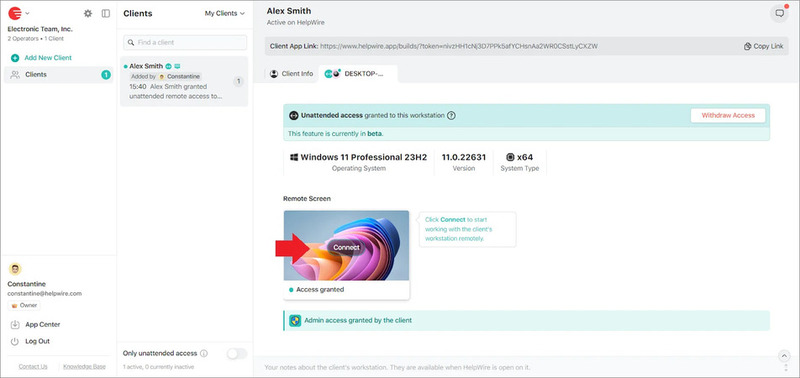
Connections default to a direct peer-to-peer path for lower latency, with an encrypted AWS relay as a fallback when a direct route isn’t possible. Sessions are protected with TLS/SSL and AES-256 encryption, and the client keeps control on their side: they can revoke unattended access at any time from the system tray or menu bar.
Comparing HelpWire and RDP dimension by dimension
Which editions and platforms work
RDP as an unattended access host is limited to Windows Pro, Enterprise, Education, or Server editions. A device running Windows Home can’t be reached this way at all. And macOS or Linux machines have no native RDP host equivalent (third-party tools like xrdp exist on Linux, but they’re a separate piece of software to install and secure, not part of RDP itself).
HelpWire installs the same way across Windows, macOS, and Linux, with no edition restrictions. If the fleet you’re supporting is mixed, that’s the difference between one tool and three separate workarounds.
Reaching a device outside the local network
This is where RDP asks the most of whoever sets it up. Connecting to a device on a different network means opening an inbound port, standing up a VPN, or deploying a Remote Desktop Gateway. All of this needs ongoing maintenance and a reasonably confident understanding of firewall rules.
HelpWire’s connection model handles this without extra setup on either side: the client installs the app, approves unattended access once, and the technician connects directly afterward, wherever the client’s machine happens to be.
Security exposure
An RDP port left open to the internet is a well-documented target. Security researchers and incident responders have tracked exposed RDP endpoints as a common entry point for brute-force attacks and ransomware campaigns for years. This is why most security guidance recommends putting RDP behind a VPN or gateway rather than exposing it directly.
HelpWire doesn’t require opening any inbound port on the client device. Traffic is encrypted end-to-end, connections default to direct routing, with the AWS-hosted fallback path.
Managing more than one device
RDP has no concept of a client list. Reaching ten different machines means keeping track of ten IP addresses or hostnames, plus whatever authentication each one needs, in a spreadsheet or a personal notes app.
HelpWire organizes unattended devices into a client directory. So a technician managing a growing list of machines can find, reconnect to, and track any of them from one dashboard, with an events timeline showing session history per device.
What happens beyond the login screen
RDP gives you a desktop session and clipboard/drive redirection if configured ahead of time. There’s no built-in file transfer window, no in-session chat with whoever might be nearby, and no dedicated event log for what happened during unattended sessions.
HelpWire includes file transfer directly in the control window, in-app chat, and an events timeline per device. It can also restore the session automatically after the remote machine restarts or a user logs out, useful for anyone applying updates unattended.
Cost
RDP itself has no license fee, but the Windows edition it requires does: Home edition can’t host a session at all, and reaching machines outside the local network usually means budgeting for VPN infrastructure or a gateway service on top.
HelpWire has a free plan, with no credit card required, and includes unattended access as a core feature rather than a paid add-on.
Side-by-side look at unattended remote access in HelpWire and RDP
| HelpWire | RDP (Windows-native) | |
| Supported platforms | Windows, macOS, Linux | Windows host only (Pro/Enterprise/Server) + cross-platform clients, not hosts |
| Works on Windows Home | Yes | No – host feature unavailable |
| Access outside the local network | Built in, no configuration | Requires VPN, port forwarding, or RD Gateway |
| Inbound port exposure | None required | Port 3389 open unless tunneled through a VPN/gateway |
| Client/device directory | Yes | None – manual tracking |
| File transfer | Built into the session window | Requires pre-configured drive redirection |
| In-session chat | Yes | No |
| Auto-reconnect after reboot | Yes | Depends on configuration (not automatic by default) |
| Event/session history | Per-device timeline | Windows Event Viewer logs, not session-specific |
| Setup on the remote device | Send a link, one-time approval | Enable RDP setting, configure network access |
| Cost | Free to start | Free feature, on a paid Windows edition, but network access adds infrastructure cost |
When RDP still makes sense
For a single admin reaching a Windows Server that never leaves the office network, already sits behind a VPN the organization maintains for other reasons, and only needs Windows-to-Windows access, RDP does the job with nothing extra to install. Organizations already standardized on Active Directory and Group Policy also get RDP access management folded into the infrastructure they’re maintaining anyway.
The friction shows up once the setup includes a mix of operating systems, machines on networks outside your control (client sites, remote employees’ home networks), or a need to reach devices without opening inbound ports.
Common scenarios
An MSP supporting client machines across different networks. RDP would mean a VPN or gateway per client site, an operational cost that grows with every new client. HelpWire’s client directory and no-configuration connection model are built for exactly this pattern.
A solo technician supporting a mix of Windows and Mac clients. RDP can’t reach the Mac clients as an unattended target at all. HelpWire covers both from the same account.
An internal IT team applying after-hours updates. RDP sessions typically end when the remote machine restarts, requiring a fresh connection attempt. HelpWire’s Reboot & Reconnect picks the session back up automatically.
Choosing between the two
RDP is a reasonable fit for Windows-only, same-network access that already sits behind the infrastructure that an organization maintains. Outside that scenario, most of the setup work moves from “connect and go” to “configure a VPN, open a port, or stand up a gateway,” and Mac or Linux targets are out of reach entirely.
HelpWire’s unattended remote access skips that setup: install across Windows, macOS, and Linux, connect directly by default, and manage every device from one client directory, at no cost to start.
FAQ
Not without extra setup. RDP has no built-in way to traverse the internet from an unknown location. Reaching a device outside the local network means configuring a VPN, port forwarding, or a Remote Desktop Gateway first.
Direct exposure of RDP to the internet without a VPN or gateway in front of it is widely discouraged in security guidance, since it’s a documented target for automated attacks. HelpWire avoids this entirely: no inbound port needs to be opened on the client device.
It doesn’t natively. RDP hosting is a Windows-only feature. To reach non-Windows machines unattended, you need different software, such as HelpWire, which supports Windows, macOS, and Linux from a single account.
No. HelpWire installs on any supported edition of Windows, plus macOS and Linux, without an edition requirement.